On Thursday 12 November 2026, a global Microsoft 365 outage left users in dozens of countries without Outlook, Teams, SharePoint, OneDrive and Copilot for hours, with disruption running into the next day. Businesses and government agencies were affected, and airlines around the world warned that customer emails and flight notifications were delayed, with some flights disrupted. Microsoft says there is no evidence it was a cyber attack, but outages like this hand criminals a ready-made excuse to get in touch.
Why this matters right now: when people are expecting messages about a service being down and then restored, a fake "verify your account to regain access" email feels believable. Criminals deliberately ride the news cycle, and the NCSC lists exploiting current events as one of the classic signs of a scam.
The anatomy of a fake Microsoft sign-in page
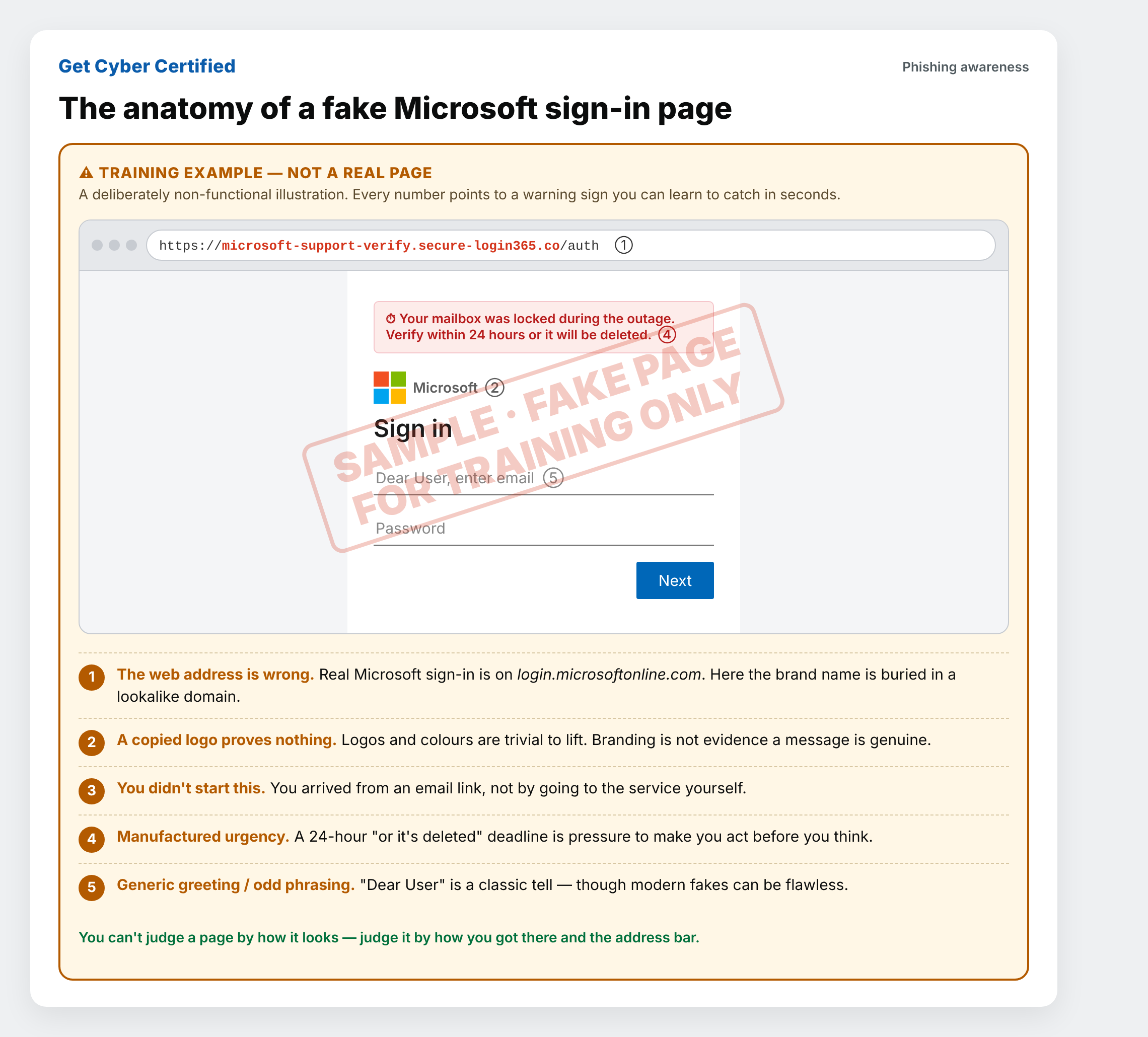
The hardest part for most people to believe is how ordinary a phishing page looks. The image at the top of this article is a labelled teaching mock-up. It is not a working page and collects nothing. Every number points to a warning sign you can learn to catch in seconds.
- The web address is wrong. Real Microsoft sign-in happens on login.microsoftonline.com. Fakes bury the brand name inside a lookalike domain. Read the address from the right, back from the first single slash.
- A copied logo proves nothing. Logos, colours and fonts are trivial to lift from the real site. Branding is not evidence that a message is genuine.
- You didn't start this. You arrived from a link in an email, not by going to the service yourself. A genuine sign-in is something you start.
- Manufactured urgency. "Verify within 24 hours or it will be deleted" is pressure to make you act before you think.
- Generic greeting or odd phrasing. "Dear User" is a common tell, though modern scams are increasingly polished and may have no spelling or design flaws at all.
The takeaway: you cannot tell a page is safe by how it looks. Judge it by how you got there and what the address bar says, and never enter your password after following a link in an unexpected message.
The five signs of a scam (NCSC)
The UK's National Cyber Security Centre boils it down to five things to watch for. If a message ticks one or more, slow down.
- Authority: does it claim to be from someone official, such as Microsoft, your bank or a government department?
- Urgency: are you given a short deadline, or threatened with fines or losing access?
- Emotion: does it make you panic, or feel fearful, hopeful or curious?
- Scarcity: is it offering something in short supply?
- Current events: does it lean on the news, like an outage everyone is talking about?
The NCSC also warns that criminals are now hiding malicious links inside QR codes in emails, so be wary of scanning them. Read the full guidance: How to spot a scam email, text message or call (NCSC).
What to do
- Stop and break contact. If something feels off, don't click, reply or scan.
- Verify independently. Go to the service directly, by typing the address or using a bookmark, rather than using any link in the message.
- Know what they won't do. Microsoft and your bank won't email asking you to confirm your password or full account details.
- Report it. Forward suspicious emails to report@phishing.gov.uk and scam texts to 7726. NCSC: report a scam email
For organisations: this is exactly what Cyber Essentials is built to reduce. Multi-factor authentication, prompt updates and good account controls mean a stolen password alone is far less likely to open the door. If someone thinks they've typed their password into a fake page, change it straight away and sign out of all sessions.
About the image: the sign-in mock-up is a clearly marked, non-functional teaching graphic made to help people recognise fraudulent pages. It is not affiliated with or endorsed by Microsoft, and "Microsoft" is referenced only to describe how impersonation scams work.
Password and MFA checklist: Check your passwords and MFA against the Cyber Essentials rules, including every cloud service.
Prefer an assessor to take you through it? See Supported Certification.
Is anything in this article incorrect or out of date?
Microsoft, Google and other vendors change their screens regularly. If you’ve spotted an error or if something no longer matches what you see, tell us here. Every report is reviewed, and we credit contributors (with your permission).